
1Input devices? what are they? they are the devices you use to instruct your computer to do something.Similar to a coach and its trainees.
1.Keyboard
There are 2 types of keyboard :
- Ergonomic Keyboard – standard keyboard
- Keyboard For Mobile – for mobile devices for the phone
Pointing Devices
1.Mouse
- Used to click an give instruction.
- fits in the palm of your hand and usually has 2 buttons


2. Touchpad


- Rectangular flat plate that you can touch with your hands and command like a mouse or cursor
- Usually found on tablets and notebooks
3.Touch Screen
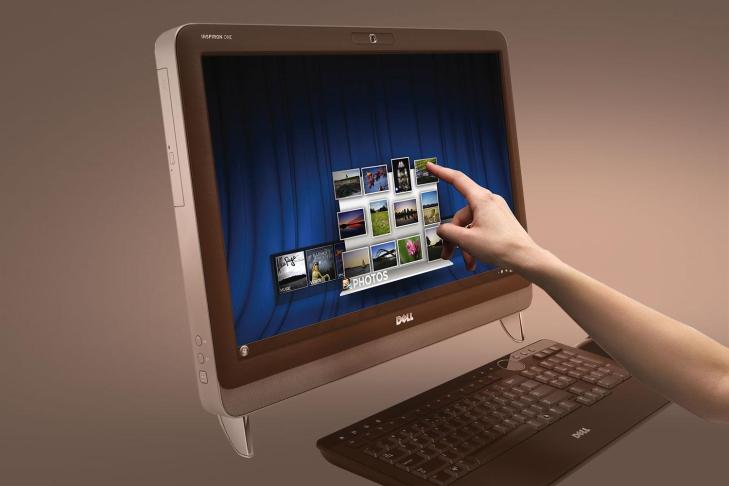
- touch-sensitive display device
- user can interact with touch screens by touching areas of the screen
-users use touch screen to perform entering text, making selections and dialing numbers
- A Kiosk is a freestanding computer; print ticket online,ATM machines etc
2.Games Controllers


Used to direct movement and interact with on screen objects for games
1.Joysticks


| *is a handheld vertical lever mounted on a base
* can move the lever in different directions to control the actions of the simulated vehicle or player |
2.Dance Pads


| *flat electronic device divided into panels that users press with their feet in response instructions from a music video games
*these games test the user’s ability to step on the correct panel at the correct time |
3.Light emitting gun


| *is used to shoot targets and moving objects after you pull the trigger on the weapon
*the screen uses one of several techniques to send light, which is received by a receptor in the barrel of the gun |
Digital Cameras
A mobile device that allows us to take pictures and store them in the form of digital information instead of traditional films
| *One factor that affects the quality of digital camera photos is Resolution
*Resolution is the number of horizontal and vertical pixels in a display device *Pixel is a smallest element in an electronic image *The greater the number of pixels the camera uses, the better the quality of the image |
Voice Input


It is the input through a microphone
| *is the process of entering any sound into the computer such as speech, music and sound effects
*to enter high-quality sound into personal computer, the computer must have a sound card *Ports that connects music device to the system unit include USB, MIDI, FireWire |
Video Input
| Video Input
– is the process of capturing full-motion images and storing them on a computer’s storage – Some video devices records using analog signals meanwhile computer use digital signal – For video to enter personal computer, the analog signal must be converted to digital signal; Video Capture Card |
WEBCAM


| *also called Video Camera
*used to capture video and still images, send email messages with video attachments, make video calls and etc |
Scanner


| Scanner
– eliminate manual data entry – user don’t have to type, speak or write into computer – capture data directly from original source documents |
| Optical Scanner | *light-sensing input device that reads printed text and graphics and then translate into a form that computer can process | |
| Flatbed Scanner | ||
| Optical Reader | ||
| Optical Mark Recognition | ||
| Bar Code Reader | ||
| RFID Reader | ||
| MICR Reader |
Biometric Input
| Biometric Input
– is the technology of authenticating a person’s identity by verifying a personal characteristics |
IRIS RECOGNITION


| *uses iris recognition technology to read patterns in the iris of the eye
*these patterns are as unique as a fingerprint |

 Amin's World Of Technology